
unknownIllustration & 3D
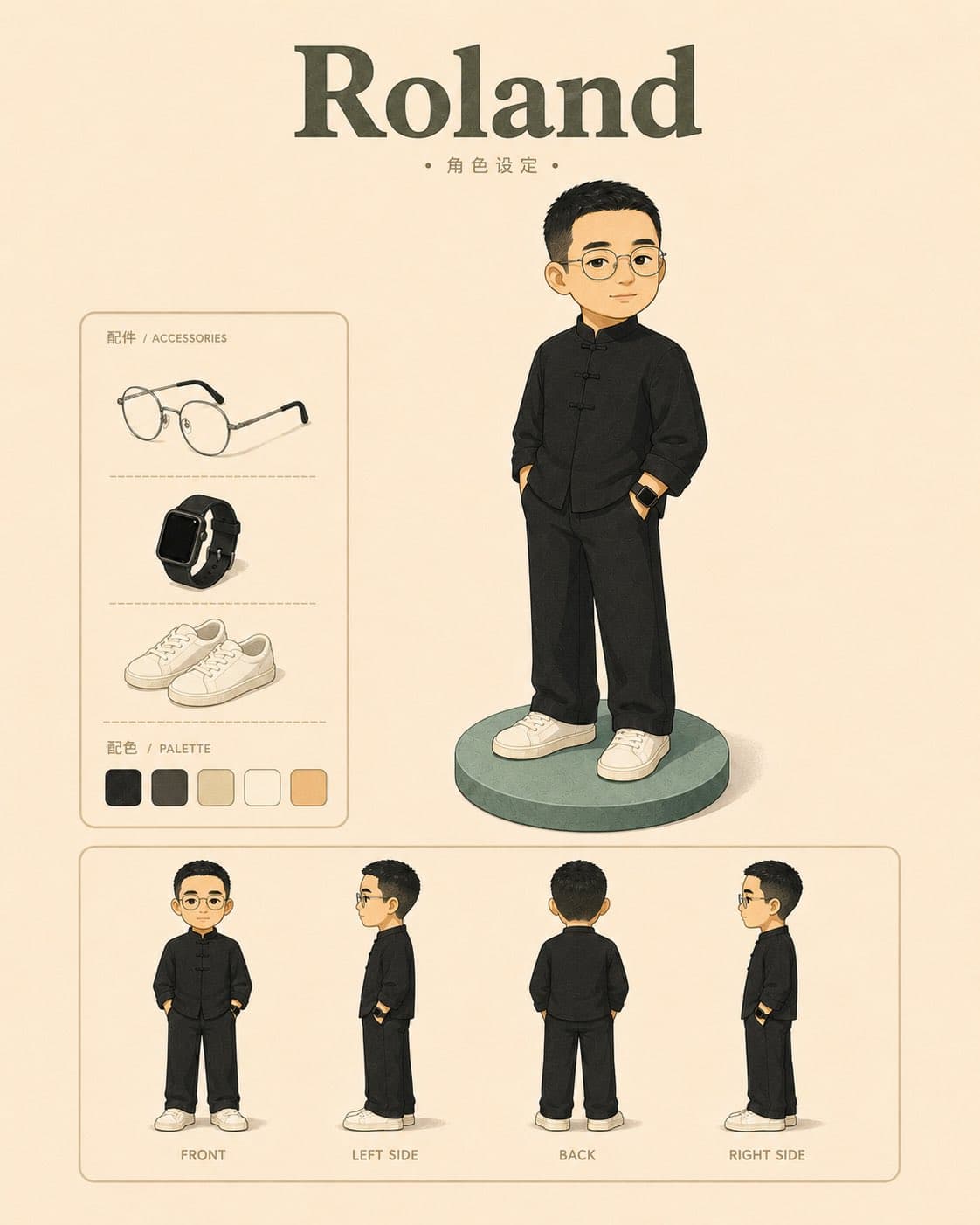
Please generate a "Retro Flat 3D Character Design Sheet" based on the uploaded portrait.…
unknown prompt and image example

@AdrianPunk115
View source post ↗👁 9,312♥ 35★ quality 87
PROMPTTranslation
Please generate a "Retro Flat 3D Character Design Sheet" based on the uploaded portrait.
【Character Name】
{{Enter name or nickname}}
【Visual Objective】
Transform the person in the photo into a reusable personal IP character.
The entire image is a character design sheet, not a scene illustration, avatar, or poster.
The image must only contain:
Full-body portrait of the main character;
Accessories display;
Color palette;
Four-view turnarounds (front, left side, back, right side).
Do not include character introductions, personality traits, style descriptions, character positioning, or long blocks of text.
I. Overall Style
Use a retro flat 3D illustration style.
Visual characteristics:
Primarily flat;
Slightly 3D/volumetric;
Clear block shapes;
Low detail;
Low saturation;
Soft shadows;
Matte texture;
Slight retro grain;
Off-white or warm white background;
Clean layout;
Ample negative space.
The overall look should resemble a professional character design manual page.
Do not create:
Realistic 3D models;
Designer toys/figurines;
Cute/chibi dolls;
Disney style;
Anime/manga style;
Realistic portraits;
Glossy plastic textures;
Complex commercial posters;
Real-life photo filters.
II. Character Fidelity
Use the uploaded photo as the sole reference.
Must retain the most recognizable features:
Face shape;
Facial proportions;
Eye expression;
Eyebrows;
Nose;
Lips;
Hairstyle;
Hairline;
Age appearance;
Skin tone;
Body silhouette;
Overall temperament.
The result must be recognizable to those familiar with the original person, but the execution must be a flat character translation, not a realistic reproduction.
III. Character Modeling
Character proportions can be slightly stylized:
Head slightly larger;
Natural body;
Simple limbs;
Stable proportions.
Do not make it overly cute.
Do not make it look infantile.
Do not use exaggerated large eyes.
Do not make it a "big-head doll."
Facial treatment:
Clear facial features;
Simple contours;
Reduced skin highlights;
Reduced realistic sculpting of the nose, lips, and eye sockets;
Use clean color blocks to represent facial structure.
Hair representation:
Retain the original hairstyle silhouette;
Retain hairline and hair volume characteristics;
Do not draw realistic hair strands;
Use generalized large blocks to represent hair.
Clothing treatment:
Can refer to the clothing in the photo;
Or automatically simplify it into a fixed character outfit suitable for long-term use.
Clothing requirements:
Simple;
Daily wear;
Recognizable;
Suitable for multi-scene reuse;
Reduced complex folds;
Reduced realistic fabric textures;
No extra brand logos;
No important accessories not present in the photo.
IV. Fixed Layout
The entire image is a vertical character design sheet, aspect ratio 4:5 or 3:4.
Background is off-white or warm white.
The image contains the following areas:
1. Top Title Area
Centered at the top:
{{Enter name or nickname}}
Small text below the title:
Character Design
Do not add any other text at the top.
2. Main Character Display Area
Place the largest full-body character in the upper-middle part of the image.
The character stands on a simple circular base.
Pose is natural, stable, and relaxed.
Can have hands in pockets or standing naturally.
Do not hold props.
Do not include computers.
Do not include tables.
Do not include machines.
Do not include work-related actions.
Do not include complex scenes.
3. Left Accessories Area
Place a simple frame on the left.
Title:
配件 / ACCESSORIES
Display only 2–3 accessories that truly belong to the character's look.
Optional:
Glasses;
Watch;
Shoes;
Top;
Hat;
Headphones;
Bag;
Other personal items clearly present in the photo.
Accessories must be consistent with the main character's look.
Do not add items randomly to fill space.
4. Left Color Palette Area
Below the accessories area:
配色 / PALETTE
Display only 4–5 color blocks that actually appear on the character.
Color blocks must come from:
Hair;
Skin;
Top;
Pants;
Shoes;
Accessories;
Base.
Do not include colors not present on the character.
Do not add irrelevant decorative colors like blue, orange, or purple.
5. Bottom Four-View Area
Arrange four small character views horizontally at the bottom:
正面 / FRONT
左侧 / LEFT SIDE
背面 / BACK
右侧 / RIGHT SIDE
The four views must remain completely consistent:
Same hairstyle;
Same face shape;
Same outfit;
Same pair of shoes;
Same set of accessories;
Same set of colors;
Same body proportions.
Do not change clothes, hairstyles, shoes, or accessories in the four-view turnaround.
V. Text Restrictions
Only the following text is allowed in the image:
Character name;
Character Design;
配件 / ACCESSORIES;
配色 / PALETTE;
正面 / FRONT;
左侧 / LEFT SIDE;
背面 / BACK;
右侧 / RIGHT SIDE.
Prohibited:
Character introduction;
Biography;
Personality;
Style;
Character positioning;
Keywords;
Long paragraphs;
Extra explanations;
Garbled text;
Meaningless English.
VI. Final Effect
The final image must be a clear, orderly, and reusable personal IP character design sheet.
Keywords:
Retro;
Flat;
Slightly 3D;
Low detail;
Block-based;
Recognizable character;
Accurate color palette;
Ample negative space;
Orderly layout;
Personal IP design sheet.
Turn this look into your image
#character design#illustration#flat design#retro style#character sheet#turnaround#accessories#color palette
Related prompts
✨ View prompt♥ 197
✨ View prompt♥ 65
✨ View prompt♥ 5
✨ View prompt♥ 44
✨ View prompt♥ 12
✨ View prompt♥ 2
✨ View prompt♥ 6
✨ View prompt♥ 3
✨ View prompt♥ 1
✨ View prompt♥ 3
![[Subject] hyperdilated landscape of calcified binary silt an](https://pub-c63007d390234d64a94ea33acc7ed30e.r2.dev/unknown/f43dca75-fcc8-4cd0-a031-0e6155150a15.jpg)
✨ View prompt♥ 1
✨ View prompt♥ 3